Event Registration Forms and GDPR: What Data Should You Collect?
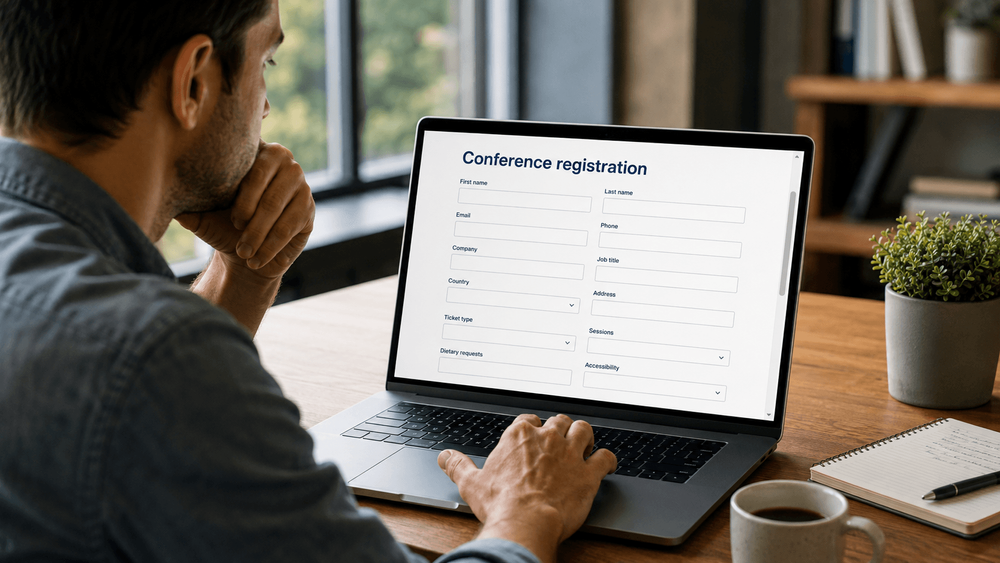
An event registration form often starts with a few simple questions, but it can quickly grow as different teams add their requests. Marketing wants a job title, sales asks for a phone number, and the venue needs meal requirements. Someone also adds a home address because it was on last year's form, even though nobody is sure whether it is still needed.
Before long, registering for a conference feels like completing a detailed application. For event teams working under the GDPR, however, the concern goes beyond making the form easier to complete. Data minimisation means collecting personal data that is relevant and limited to what is necessary for a defined purpose, rather than gathering information because it might be useful one day. The European Commission's overview of GDPR principles explains this requirement.
The practical starting point is to review every proposed field and understand what it helps you do, who needs the answer and when you need to collect it. This guide takes you through those decisions, with examples you can use when reviewing your own registration process.
This article provides general information, not legal advice. Review your event's requirements with your data protection officer or legal adviser, including any relevant national rules.
Start with the purpose, not the form builder
Before building the form, ask each team to explain how it will use the information it requests. A general statement such as “we need attendee data” does not tell you much, while “we need an email address to send the ticket and important event updates” connects the field to a clear operational purpose.
For each proposed field, record:
- The specific purpose and the person responsible for it.
- Who needs access, including suppliers and connected systems.
- Whether the answer is required, optional or needed later.
- The lawful basis to review before collection.
- When the information should be deleted or reviewed.
If nobody can explain how an answer changes an event task, question whether the field belongs on the form.
Review the main types of registration data
Identity and contact details
For many conferences, a name and email address are enough to create the initial attendee record and deliver a ticket, although the right starting point depends on the event. Additional contact and professional details should be reviewed separately rather than treated as part of a standard package.
A phone number, for example, may support an agreed SMS service, while a company name may be relevant to eligibility or badge printing. A job title could belong in an optional networking profile instead of the main registration step. By contrast, asking for a home address deserves a clear explanation when attendance is in person and nothing will be posted.
Ticket type and eligibility
Ticket category, selected dates and workshop choices may be necessary to manage access and capacity, while some events also need to check eligibility for member, student or invited-delegate tickets. Where evidence is required, consider the least detailed information that can support the check; a membership number, for example, may be enough without requesting a document upload.
If a check applies only to one ticket category, the related questions should not appear as requirements for every attendee. It is also worth deciding in advance who will review the evidence and what will happen to it once the decision has been made.
Payment and billing
Payment details should be collected through the appropriate payment service, never through a general registration question, comment box or email. The billing questions should also match the actual transaction and applicable invoicing requirements, since a company invoice request may need different information from a free visitor registration.
As you review this part of the process, map which details reach the payment provider, finance team and event platform. This helps you separate financial information from operational records, so the person checking tickets at the entrance does not receive a billing export simply because it is convenient.
Meals, accessibility and other event services
Some information is useful only closer to the event or when an attendee requests a particular service. Airport arrival details, for example, belong in a transfer-booking process rather than the initial form for everyone. An emergency contact also needs a specific justification and should not automatically appear on every conference registration.
Dietary and accessibility questions need particular care because responses can reveal health information or religious beliefs, although not every meal preference does. Special-category data needs an Article 6 lawful basis and an applicable Article 9 condition, so a general registration checkbox is not enough. Review the European Commission's guidance on sensitive data with your adviser.
When designing these questions, focus on the support an attendee needs rather than asking for a medical history. A suitable private contact route can help keep more detailed discussions out of a general form, although it does not remove the responsibilities for handling that information properly.
Networking and sponsor interests
A public attendee profile serves a different purpose from an internal registration record, so people should understand which profile details other attendees will see. The same care is needed with sponsor sharing: registering for an event should not silently place someone on every sponsor's contact list.
Explain any proposed sharing, why it is planned and what choices the attendee has, keeping these decisions separate from the information needed to issue a ticket.
Give each field one of four decisions
Once the purposes are clear, use the following table to decide where each field belongs. These examples are starting points for discussion rather than legal conclusions for every event.
| Decision | When it fits | Example to review |
|---|---|---|
| Required now | Necessary to complete the current registration step | Email address for an emailed ticket |
| Optional now | Supports a defined optional feature or service | Job title for a networking profile |
| Collect later | Needed only at a later stage or for a selected service | Arrival time for a booked airport transfer |
| Remove or replace | No clear purpose, or a less detailed answer would work | Remove a home address when no delivery or billing need exists |
Making a field optional does not remove the GDPR obligations associated with it: you still need a purpose, an appropriate lawful basis and suitable handling of the answer. Similarly, collecting information later means asking at a more relevant stage with the necessary explanations and safeguards, not postponing those responsibilities.
For a simple professional conference, this review might leave name, email and ticket type in the first step, with billing questions appearing only when relevant. Transfer details would be collected from people booking transport, while attendees who want a networking profile could complete it separately.
Choose a lawful basis for each purpose
There is no single “GDPR checkbox” that makes every use of a registration record lawful. Consent is one possible lawful basis, but processing may instead be necessary for a contract or a legal obligation, depending on the circumstances. Legitimate interests may be relevant to some purposes, although they require an assessment rather than a general assumption. The European Data Protection Board's guide to lawful processing explains these distinctions.
The important step is to connect the lawful basis to each purpose before collection, without assuming that issuing a ticket and sending future promotions have the same basis. Where consent is used, it must be freely given, specific, informed and unambiguous, which means an active choice rather than a pre-ticked box. You also need evidence of that choice and a withdrawal process that is as easy as giving consent, as explained in the same EDPB guidance.
If the team is uncertain about a purpose or its legal basis, resolve it with your adviser before the form goes live.
Explain the data use where people provide it
A privacy-policy link in the website footer is easy to miss during registration, so place a short explanation near the form with a clear link to the full privacy notice. Unusual or more sensitive questions may also need a specific explanation beside the field, where the attendee can read it before answering.
The notice should address the organiser's identity and contact details, purposes and lawful bases, recipients, relevant international transfers, retention, rights and complaint routes. Where applicable, it should also explain whether information is obligatory and what happens if it is not provided, alongside any other required details relevant to the processing. See the European Commission's guidance on information obligations.
Make sure the wording reflects the actual process, including arrangements such as passing meal requests to a catering supplier. Clear, specific language helps here: “We use your email address to send your ticket and essential event updates” is easier to understand than “We process your details for administrative purposes,” although neither sentence replaces the full notice.
Separate event updates from marketing
A registration confirmation, a changed entrance location and an event cancellation serve different purposes from a newsletter promoting next year's conference. Your communication process should reflect that distinction, with clear information about the sender and type of marketing, as well as a working unsubscribe route. Where marketing relies on consent, declining it should not prevent someone from registering.
Be careful about adding promotional content to operational emails without reviewing the consequences, since email marketing involves applicable national electronic-marketing rules as well as GDPR. France's regulator, CNIL, explains this distinction in its guidance on electronic communications to customers and prospects.
Before launch, test the process by registering once with marketing selected and once without it, then check which lists receive each record and which messages follow. This is a practical way to confirm that the choices on the screen are respected by the connected systems.
Make the form easier to complete
Once you know which information belongs on the form, the next task is to make the questions easy to understand and answer. Group related fields together, clearly mark required answers, and use labels that remain visible while someone types. Helpful error messages should appear beside the relevant question rather than leaving the attendee to search for a problem.
Test the experience on a phone, where long lists, small controls and unclear date formats can make even a short form difficult to use. Prices and fees should be visible before the final step, and any account requirement should be explained early. If the process genuinely needs several steps, useful progress information can help people understand what remains.
The wording matters as much as the layout, particularly around optional choices. A neutral “No, thank you” is clearer than language suggesting that declining marketing is a mistake. There is no universal ideal number of fields; the more useful question is whether each one earns its place and is presented clearly.
Test where each answer goes
Testing should continue beyond the confirmation screen, so submit a registration using clearly fictional data and follow the record through the event platform, CRM, email service, payment system and badge tools. Include downloaded spreadsheets, support notifications and sponsor transfers in the review, along with analytics and error logs where personal information could appear accidentally.
Look for unnecessary sharing between these destinations. A badge export might include meal requests that the printing team does not need, or the CRM might receive every answer when only contact details are relevant. It is also worth checking whether an old export could overwrite a marketing choice that the attendee changed later.
Record who can access each destination, where processing takes place and how corrections and deletion are handled, including supplier arrangements and relevant transfer checks. For the broader process, see our GDPR guide for event registration.
Plan correction and retention before launch
Attendees make typing mistakes and change their plans, so give them a clear way to request corrections and check that the updates reach the relevant systems. A corrected name in the main database is of limited use if the badge supplier continues working from an old file.
Retention also needs to be planned by purpose and record type, because the GDPR does not provide one standard period for all event registration data. Information should be kept no longer than necessary while accounting for applicable legal obligations, as explained in the European Commission's guidance on processing principles. In practice, finance records, temporary meal-service lists and marketing preferences may need different treatment.
Assign an owner to each retention action and include local spreadsheets and on-site files alongside the main database. Ask suppliers how deletion works in active systems and backups, rather than assuming that removing a record from one place immediately removes every copy.
Use this simple form-field planner
To bring these decisions together, create a review document with one row for each field and the information below. It gives the event team, supplier and privacy adviser a shared reference before configuration begins.
| Planner item | What to record |
|---|---|
| Field and purpose | The question and the specific task it supports |
| Collection decision | Required now, optional now, later, or remove/replace |
| Legal review | Lawful basis; special-category condition if relevant |
| Access and destinations | Teams, suppliers, integrations and exports |
| Attendee explanation | Notice text, required-field explanation and relevant choices |
| Retention and owner | Deletion or review trigger and responsible person |
For a badge-display name, for example, the purpose might be to print the attendee's preferred name, while the remaining entries explain when to ask for it, which badge supplier receives it and when temporary print files are removed.
Complete the planner with the people who will actually use the data, since a purpose that looks clear on paper may turn out to be unnecessary once the operational team reviews it.
Where PLANARA can help
PLANARA offers a tailored registration process, multilingual event websites and data export, as described in our feature overview.
These capabilities provide a starting point for discussing a registration journey that fits your event, although they do not establish GDPR compliance on their own. The configuration, contracts and daily working practices still need to be reviewed against your requirements.
Bringing your field planner to a demonstration makes that discussion more specific: you can ask how your proposed questions, privacy information, communication choices, access needs and retention process would be handled, then confirm what is available and what requires customisation. For more preparation, read our questions to ask event software vendors.
Ask for enough, not everything
A useful registration form helps you deliver the event without collecting information simply because there is space for another question. By defining each field's purpose, you can decide whether to require it, make it optional, collect it later or remove it, then check that the answer is handled appropriately after submission.
Want to review a registration process for your next conference? Book a PLANARA demo and bring your current form or field planner.
Frequently asked questions
What information should an event registration form collect?
The form should collect what is necessary for defined event purposes, with name, contact details and ticket choice as common starting points. Billing, eligibility and service requests should be reviewed separately rather than included automatically.
Does an event form need a GDPR consent checkbox?
Not every processing purpose requires consent, so identify the appropriate lawful basis for each use before deciding which choices the form needs. Acknowledging a privacy notice is not blanket consent to everything described in it.
Can dietary and accessibility information be sensitive data?
Yes, responses can reveal health information or religious beliefs, depending on the questions and answers. Review them before collection so you can establish the required legal grounds and limit both the details requested and access to them.
Should marketing consent be separate from event registration?
Where marketing relies on consent, provide a separate, clear choice so that an attendee can decline optional marketing while still completing registration.
How long should form responses be retained?
There is no single period for every response, so document retention by purpose and record type while taking account of applicable legal requirements. The plan should include exports and supplier-held copies as well as the main registration database.