11 Questions to Ask an Event Software Vendor Before You Sign11 Questions to Ask an Event Software Vendor Before You Sign
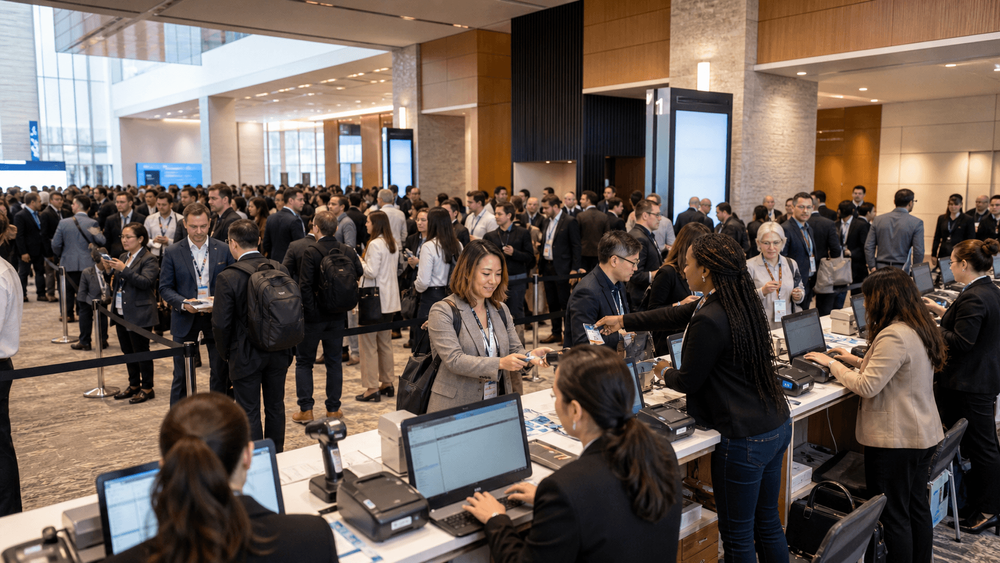
An event software demo usually follows the vendor's strongest path. The sample event is already configured, the attendee behaves exactly as expected, and every click leads to the next prepared screen.
Your real event will not be that tidy. Ticket categories reach capacity. Names need correcting. Attendees arrive without confirmations. A sponsor requests data your privacy team has not approved. The Wi-Fi becomes unreliable just as the entrance fills.
The right vendor evaluation therefore tests more than a feature list. It shows whether the platform, implementation team, contracts, and support model can handle your actual event—including the exceptions.
Use these 11 questions in every demonstration and procurement review. Ask each vendor for the same evidence, then compare what has been demonstrated and documented rather than what has merely been promised.
Before the demo, define the event you need to run
Give vendors a short operating brief before they prepare the demonstration. Include your attendee types, languages, ticket rules, expected registration peaks, payment requirements, check-in setup, reporting needs, integrations, privacy requirements, and launch date.
Also give them two or three difficult scenarios. For example:
- a ticket category becomes full while people are checking out;
- an attendee needs to change their ticket and correct personal information;
- a group arrives together, but one person is missing from the check-in list;
- an organizer must export complete event data at the end of the contract.
This makes the conversation specific. It also prevents every vendor from defining “success” around whichever features are easiest to show.
1. Can you demonstrate our complete attendee journey?
Ask the vendor to start with your event website and continue through ticket selection, registration, payment where relevant, confirmation, later changes, cancellation, communications, and arrival. If you serve an international audience, repeat the journey in the required languages and on a phone.
A strong answer uses your scenario and explains where configuration, custom work, or manual intervention is required. The vendor should be comfortable showing error messages, capacity limits, change requests, and other less polished parts of the journey.
A warning sign is a generic slideshow or a demonstration that jumps between unrelated sample screens. “We can customize that” is not enough unless the vendor can explain what can change, who changes it, how long it takes, and what it costs.
Ask for a configured test journey or a recorded walkthrough based on your requirements.
What useful customization looks like: RAKFSC
PLANARA has done this kind of work for a real client. For the Ras Al Khaimah First International Forensic Sciences Conference, or RAKFSC, we customized the registration process around the conference's requirements rather than forcing the organizer into a generic form.
RAKFSC was a three-day international conference in Ras Al Khaimah, with English and Arabic listed as event languages. Its attendee journey needed to belong to that event, not look like a lightly edited template.
That is what good customizable event software should make possible: the registration process adapts to the event's audience, rules, content, and operating model. Customization should still remain supportable, testable, and clearly scoped. If every change becomes a fragile one-off project, flexibility turns into risk.
2. How do you handle ticket rules, capacity, and exceptions?
Describe your real ticket structure. Include tiers, quotas, invitation codes, approvals, waiting lists, group bookings, substitutions, cancellations, refunds, walk-ins, and deadlines.
A strong answer separates the automatic rules from the actions your team must take. It shows what happens when two people try to claim the last place, when a cancellation releases capacity, or when an organizer overrides a rule.
A warning sign is a platform that technically supports ticket types but relies on spreadsheets or vendor support for common changes. Manual work is not automatically unacceptable, but it must be visible before you sign.
Ask for a workflow matrix showing which scenarios are automatic, organizer-controlled, vendor-assisted, or unsupported.
3. How do multilingual, localization, and accessibility needs work end to end?
A translated landing page is only the beginning. Test the form, field validation, payment pages, confirmation emails, tickets, PDFs, badges, date and time formats, currencies, names, and right-to-left layouts where relevant.
A strong answer demonstrates the complete journey in the languages you need. It explains who manages translations, what content falls back to another language, and how updates remain consistent. The vendor should also be able to provide relevant accessibility documentation and explain how the product is tested.
A warning sign is a language selector that changes marketing copy while errors, system messages, or confirmations remain untranslated.
Ask for a complete test registration in every required language and the platform's current accessibility information.
4. What happens during a launch spike or service interruption?
Registration traffic is rarely even. A speaker announcement, ticket release, email campaign, or deadline can send many attendees to the site at once.
A strong answer explains capacity planning, monitoring, incident response, recovery, status communication, and support escalation. The level of technical evidence will depend on the procurement stage, but the vendor should be able to discuss realistic failure scenarios without making impossible promises.
A warning sign is “the platform never goes down.” Reliable systems are designed around prevention and recovery, not denial that incidents can occur.
Ask for relevant service commitments, incident procedures, status information, and an explanation of how expected peaks will be planned.
5. How do check-in, badges, and connectivity exceptions work?
Do not evaluate on-site operations from a slide. Demonstrate a normal scan, attendee search, badge issue, reprint, walk-in, duplicate ticket, group arrival, and a temporary connectivity problem.
A strong answer shows the actual devices and steps your team will use. It explains staff permissions, printer and scanner requirements, fallback procedures, and how offline or temporary records are reconciled afterwards.
A warning sign is an assumption that any device or printer will work, or that venue connectivity will always be sufficient.
Ask for a live rehearsal or a detailed event-day runbook covering equipment, staffing, exceptions, and escalation.
6. What is included in the total price?
The quoted platform fee may exclude the work that makes the event operational. Ask about setup, events, users, attendees, payments, messages, languages, domains, integrations, check-in equipment, support, training, changes, exports, renewals, and contract exit.
A strong answer provides an itemized quote with volumes, assumptions, limits, and the events that trigger additional charges. It should make custom work and optional services easy to distinguish from standard configuration.
A warning sign is “all-inclusive” without a written definition, or a low entry price that leaves essential implementation work unpriced.
Ask for a complete cost model using your expected event volume and scenarios. You can also review PLANARA's current pricing options before discussing a scoped proposal.
7. Who controls the data, and can we export it completely?
Data ownership should be practical. Confirm whether your team can export registration, ticket, payment-status, attendance, communication, and audit information in understandable formats.
A strong answer explains self-service access, export formats, field definitions, attachments, identifiers, timestamps, frequency limits, post-contract access, and migration assistance. The vendor should be willing to provide a sample export before purchase.
A warning sign is “your data is yours” followed by partial exports, undocumented fields, delays, or unexpected fees.
Ask for a sample export, a data dictionary, and the contract terms governing access during and after the relationship.
8. What are our respective GDPR roles and contractual responsibilities?
If the GDPR applies to your processing, determine responsibilities for each activity. The organizer will often decide why and how core attendee data is processed, while a platform may process that data on the organizer's instructions. Actual roles depend on the workflow and cannot be settled by a marketing badge.
A strong answer is specific about controller and processor responsibilities, documented instructions, assistance, deletion or return, audit information, and the applicable data processing agreement. It also leaves room for your legal or privacy team to review the facts.
A warning sign is “the platform is GDPR-compliant” without explaining the services, contractual role, and evidence behind the statement.
Ask for the current contract or DPA and map it against the operational lifecycle described in our GDPR event-registration guide.
9. Where is personal data stored and accessed, and which subprocessors are involved?
Hosting location is only one part of the answer. Ask where data is stored, where support or engineering teams can access it, which subprocessors are used, how changes are communicated, and whether international transfers are involved.
A strong answer provides current, scoped information and distinguishes storage, remote access, backups, integrations, and subprocessor processing. Where transfers are relevant, the vendor should identify the applicable mechanism and supporting documentation.
A warning sign is treating EU hosting as automatic proof that the complete processing operation satisfies the GDPR.
Ask for the current subprocessor list, relevant locations, transfer information, and the change-notification process.
10. How do security, retention, deletion, and attendee-rights workflows operate?
Security claims matter only when they match the service you are buying. Ask about access controls, logging, encryption, incident handling, backups, retention configuration, deletion or anonymization, and assistance with applicable attendee requests.
A strong answer explains how your team would locate, correct, export, restrict, or delete an attendee record where required. It also states what happens in connected systems and backups, and what evidence the vendor can provide at the appropriate procurement stage.
A warning sign is using one certification as proof of complete security or GDPR compliance. Certifications can be valuable evidence, but their scope and current validity matter.
Ask for security documentation, relevant certification or audit information with its exact scope, retention and deletion behaviour, and the support procedure for individual-rights requests.
11. Who owns implementation, support, and contract exit?
The product is only one part of delivery. Identify who gathers requirements, configures the event, migrates data, tests the journey, trains staff, approves changes, supports launch, and responds when an urgent issue is not resolved at first contact.
A strong answer names both vendor and client responsibilities, dependencies, decision dates, support hours, severity definitions, escalation routes, renewal rules, and exit steps. It treats launch and contract exit as planned work rather than surprises.
A warning sign is a confident launch date without an implementation plan, or support described as “premium” without operating details.
Ask for the implementation plan, support policy or service commitments, renewal provisions, data-return process, and termination clauses.
How to score the answers
Use one scorecard for every vendor. For each requirement, record one of four states:
- Supported: demonstrated in the standard product.
- Configurable: available through agreed configuration.
- Custom: requires scoped development, cost, testing, and maintenance.
- Not supported: unavailable or dependent on an unacceptable workaround.
Then score each answer from 1 to 5 across six areas:
| Area | What to assess |
|---|---|
| Fit | Does the answer satisfy the actual event requirement? |
| Evidence | Was it demonstrated, documented, and reflected in the contract? |
| Manual work | How much organizer or vendor intervention is required? |
| Risk | What happens when the workflow fails or demand changes? |
| Ownership | Is responsibility clear during implementation and operations? |
| Cost | Are setup, usage, change, support, and exit costs visible? |
Record unanswered questions separately and assign an owner and resolution date. A high score should never erase a failed requirement involving payments, permissions, data export, privacy, or event-day operations.
For a broader evaluation framework, read How to Choose Event Registration Software.
Put PLANARA through the same test
PLANARA is designed for organizers who need tailored event websites and registration journeys, configurable ticketing, multilingual delivery, badge scanning, attendee updates, scalable infrastructure, support, and access to their event data.
The RAKFSC registration customization is one example of how the process can be shaped around a client's conference rather than reduced to a generic form. Your requirements may be different, which is exactly why they should be demonstrated and scoped before you buy.
Bring these 11 questions, your real ticket rules, and your most difficult attendee scenario to a PLANARA conversation. For privacy, security, pricing, and contractual requirements, ask for the current evidence relevant to your specific implementation rather than relying on a general product statement.
Book a PLANARA demo and ask us the same questions you would ask any other vendor.
Buy the evidence, not the presentation
A polished demonstration shows that a vendor can prepare a polished demonstration. It does not prove that the platform can handle your registration rules, event-day pressure, data responsibilities, or contract exit.
Define the scenarios first. Ask every vendor the same questions. Record what is standard, configurable, custom, manual, or unsupported. Then connect the evidence to the quote, implementation plan, support terms, privacy documents, and contract.
That process will not eliminate every event risk. It will show you which vendor understands the work, which uncertainties remain, and what must be resolved before you sign.